


Bingo Home Design: Live Bingo!
4.81.29K Reviews
App Specs
- Version
- 2.0.2
- Updated On
- License
- Free
- Downloads
- 1,000,000+
- Developer
- ELESTORM(SINGAPORE)
- Categories
- Board
- Platform
- Android
Screenshots


 Analysis by AppCompare
I like the idea of a bingo game that gives each round a purpose beyond filling a card. Bingo Home Design: Live Bingo! pairs quick number-marking play with a home-design theme, so there’s a creative goal alongside the usual excitement of waiting for a call. In my experience, that combination is best for short, relaxed sessions: play a little, make progress, then put the phone down without needing to treat the game like a serious hobby.
What to expect from the pace
The store summary describes a multi-bingo voyage, which sets an expectation of lively rounds rather than a slow, solitary board game. I’d approach it as a casual game to dip into when I have a few spare minutes, not as something guaranteed to run at exactly the same pace on every phone or connection. Bingo depends on keeping track of calls, so a moment of lag can matter more than it would in a turn-based puzzle; if the screen feels delayed, I would pause before committing to another round.
The game is free to start, and its Everyone age rating makes it broadly suitable for a family setting. Still, the purchase options are worth noticing before handing a device to a child: in-app items range from $0.99 to $199.99 each. I’d use the device’s purchase controls and agree on a spending rule first, especially if the appeal of faster progress could make optional purchases tempting.
When play gets busy
A useful way to enjoy a bingo-and-design game is to separate the two kinds of attention it asks for. During a round, focus on the numbers and avoid switching apps or answering messages if you can; afterward, use the decorating side as the calmer part of the session. That small routine makes the change of pace feel intentional instead of trying to track a card while also deciding how to arrange a room.
For an everyday example, I can imagine opening it while waiting for a friend at a café. One round can fill a short gap, while the home-design theme gives me a reason to return later and make a small creative choice. If I’m on a commute, I’d only start when I have enough time and a stable moment to pay attention; a game that asks me to watch calls is a poor fit for a stop-and-start journey where I might need to put the phone away suddenly.
Reliability and sensible expectations
My main practical advice is to treat any occasional pause as a cue to slow down, not as a reason to chase progress with purchases. The published version is 1.3.6, and ELESTORM(SINGAPORE) is the developer. Those details help identify the release, but they don’t guarantee identical performance across devices. If a session is interrupted, I’d reopen the game and check what progress remains before starting another round; that is a sensible habit for any mobile game where timing and session continuity matter.
There is also a useful distinction between a game feeling busy and a phone being overloaded. Bright visuals, repeated rounds, and moving between activities can make a session feel demanding, but I wouldn’t assume that means the app is unusually resource-heavy. On an older device, close other demanding apps first and try a short session before settling in for longer play. If the phone warms up, the screen stutters, or battery use feels uncomfortable, take a break rather than pushing through; those are practical signs to manage your device, not evidence that every player will have the same problem.
Worth Reading Before You Choose

EA SPORTS FC Mobile 26 Is a Bigger Football Game, but It Takes Time

Flipboard Shows What News Apps Must Do Beyond the Feed

Switching to Android Auto Means Rethinking Your Driving Routine

Google Calendar Makes a Crowded Week Easier to Manage

Ludo King Makes the Most of the Minutes Between Plans

Baby Panda World Brings Quick Play to Modern Phones, but Its Game Library Feels Busy
Who will enjoy this mix
This suits someone who already enjoys bingo and likes having a light creative reward attached to it. It may also work for a player who finds a plain number-card game too repetitive, because the home-design theme gives each visit another reason to continue. The game is free to download, and its audience is substantial: it has over 1 million installs, a 4.9 average from around 30,000 ratings, and roughly 1,300 written reviews. Those figures suggest that many players have tried it, though they can’t tell me whether its particular balance of bingo and decorating will match your taste.
I would skip it if I wanted a pure design simulator with unrestricted decorating as the main event, or a traditional bingo app with no side activity. Here, the two ideas are tied together, so someone who dislikes either half may find the loop less appealing. Likewise, if you prefer games with no optional spending, the purchase range is a reason to be cautious: you can begin for free, but it’s sensible to decide in advance whether you’ll ignore paid items.
How it compares with familiar alternatives
Compared with a basic bingo app, the home-design theme gives this game a longer-term sense of purpose, but it also adds another layer between a round and the next. Compared with a dedicated decorating game, bingo makes progress depend on playing rounds rather than focusing only on arranging a space. That trade-off is the defining choice: it’s a better fit if you enjoy both activities, and a weaker one if you want either activity without the other.
If I were choosing between this and a standard board game for a quick break, I’d pick it when I wanted an active, visual session and had time to pay attention. For a quieter moment when interruptions are likely, a turn-based board game or a simple offline puzzle would be easier to set aside and resume. The game’s board-game roots make the number calls familiar, but the added decorating goal changes the rhythm from a standalone match to a loop of playing and personalizing.
Getting Started
Diving into Bingo Home Design: Live Bingo! is a breeze. The app is available for both Android and iOS, and the download is quick and hassle-free. As soon as you open the app, you’re greeted with a vibrant and user-friendly interface that immediately draws you in. The colors are bright, the graphics are smooth, and it’s clear that a lot of effort has gone into making the visuals appealing.
The Bingo Experience
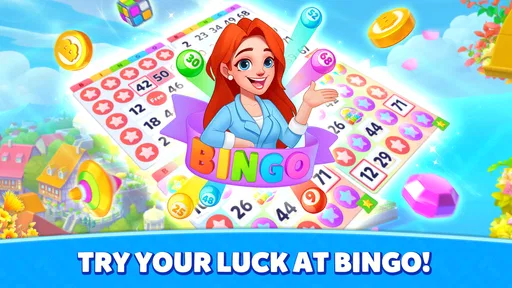
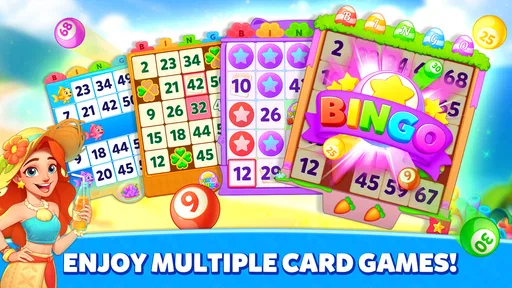
Let me tell you, the bingo part of this app is anything but ordinary. It’s fast-paced and engaging, offering a variety of rooms and themes that keep the gameplay fresh and exciting. Whether you’re a bingo newbie or a seasoned pro, you’ll find a level that suits you. I particularly enjoyed the themed rooms, which add an extra layer of fun to the traditional bingo experience.
Playing bingo here isn’t just about marking off numbers; it’s about strategy and timing too. The power-ups and bonuses make each game thrilling, and I found myself eagerly anticipating the next round.
Designing Your Dream Home
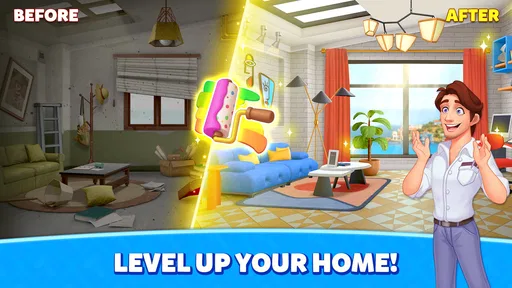
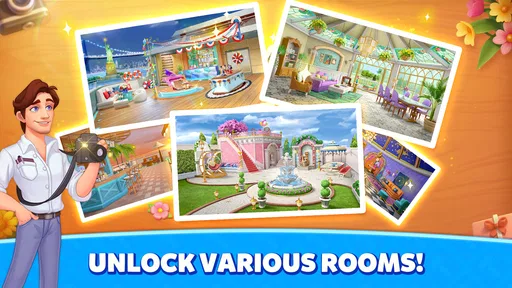
Now, onto the home design aspect, which is where this app truly shines. After winning bingo games, you earn coins that can be used to buy furniture and decorations for your virtual home. The selection is impressive, with a wide range of styles to choose from. Whether you’re into modern chic or vintage charm, there’s something for every taste.
I loved how easy it was to drag and drop items into place. The app provides a satisfying amount of control over the layout and design of each room, allowing you to fully express your creativity. It’s like playing a game of bingo to earn your way to your dream home, and I found this concept both unique and rewarding.
Community and Challenges
One of the standout features of Bingo Home Design is its community aspect. You can connect with friends, participate in design challenges, and even vote on other players’ designs. This social element adds a whole new dimension to the game, making it not just about design and bingo, but also about interaction and engagement.
The challenges are particularly fun and often themed around current events or holidays, adding a timely twist to the design aspect. It’s a great way to draw inspiration from others and see how your own style measures up.
A Few Quirks
While the app is generally smooth and user-friendly, there were a few times when it felt a bit sluggish, especially when switching between bingo and design modes. However, these moments were rare and didn’t detract much from the overall experience.
Also, while the in-app purchases aren’t necessary to enjoy the game, they can be tempting, especially if you’re eager to speed up your progress. It’s something to be mindful of if you’re trying to play without spending extra cash.
Final Thoughts
Overall, Bingo Home Design: Live Bingo! is a delightful blend of gaming and creativity. It’s perfect for those who love bingo and have a passion for interior design. The app is engaging, visually appealing, and offers endless hours of entertainment. Whether you're looking to unwind with a few rounds of bingo or flex your creative muscles by designing your dream home, this app has you covered. So, grab your virtual bingo card and start designing your masterpiece!
My performance verdict
For a board game, the combination of rapid bingo calls and room decorating creates two different kinds of phone use: quick visual decisions during play, then slower choices when arranging a space. I’d judge it by how comfortably it handles that switch on your device, rather than expecting every session to feel perfectly smooth. The game was released on June 5, 2023, and Android users need version 6.0 or later; those details are useful when checking compatibility before installing.
In the wider board-game category, its 4.9 average and free entry make it easy to understand why people give it a try, but neither number settles the question of fit. The strongest reason to install it is the specific pairing of bingo rounds with a decorative payoff. My advice is to begin with a brief session, see whether the number pace suits you, and decide whether the design side feels rewarding enough to keep coming back. If you mainly want a conventional bingo match, choose a simpler bingo game; if you want to plan rooms without earning progress through play, choose a dedicated design title instead.
Pros
- Engaging blend of bingo and design tasks.
- Vibrant graphics enhance the gaming experience.
- Variety of levels keeps gameplay fresh.
- User-friendly interface for easy navigation.
- Frequent updates with new content.
Cons
- In-app purchases can be expensive.
- Requires constant internet connection.
- Some levels feel repetitive over time.
- Ads may interrupt the gameplay experience.
- Limited customization options for designs.
FAQs for Bingo Home Design: Live Bingo!
What is the main objective of Bingo Home Design: Live Bingo?
Bingo Home Design: Live Bingo combines the excitement of bingo with home design challenges. Players earn resources by winning bingo games, which they can then use to renovate and decorate various rooms in virtual homes. The main objective is to successfully complete design tasks while enjoying the thrill of bingo.
Is an internet connection required to play Bingo Home Design: Live Bingo?
Yes, an internet connection is necessary to play Bingo Home Design: Live Bingo. This allows players to participate in live bingo games, compete with other players, and access new design challenges and updates. A stable connection ensures a seamless gaming experience.
Are there in-app purchases available in Bingo Home Design: Live Bingo?
Bingo Home Design: Live Bingo offers in-app purchases that allow players to buy additional resources, such as coins and tickets, which can be used for bingo games and home design items. While these purchases can enhance gameplay, they are entirely optional, and players can progress without them.
Can I play Bingo Home Design: Live Bingo with friends?
Yes, Bingo Home Design: Live Bingo includes social features that let you connect with friends. You can invite friends to play, see their progress, and even compete in bingo games together. This adds a fun, competitive edge to the game and enhances the overall experience.
What age group is suitable for playing Bingo Home Design: Live Bingo?
Bingo Home Design: Live Bingo is suitable for players aged 12 and above. The game involves strategic thinking and decision-making related to home design, making it appealing to both teens and adults. Parental guidance is recommended for younger players due to in-app purchases and online interactions.


